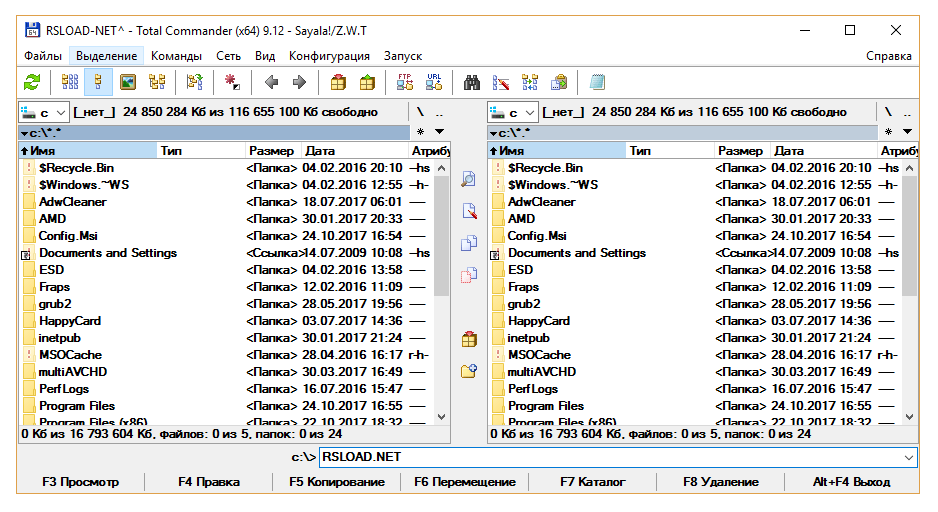
The two-pane file manager Total Commander allows you to conveniently copy and move files and folders, as well as having useful tools and plugins for working with files
Total Commander is a simple and convenient file manager with a simple yet feature rich interface. In addition to standard file operations, such as copying, moving, deleting and renaming, it supports working with archives, working with a group of files, advanced search and grouping files and folders.
A customizable two-pane interface allows you to change the size of panels, set up columns with file properties, and add your own buttons for quick access to various programs and commands.
The functionality of Total Commander can be extended using plugins. Plugins are available for decompressing certain types of files, viewing the contents of files, working with external and network devices, and obtaining various information about files.
Total Commander for Android includes the main features of the desktop version. Using the plugin TotalCmd-FTP, it is possible to work with FTP servers. The "Superuser" permission provides a full experience on Android devices with root rights. Root functions allow Total Commander to write to system folders such as /system or /data.
The program is very similar to the Far Manager file manager, but significantly improved and improved. In addition to managing files, the program has many other functions. The built-in FTP client allows you to connect to FTP servers to exchange the necessary information. Also, thanks to the built-in archivers, it can be used to pack and unpack file archives, such as ZIP or RAR. The program is compatible with new Windows OS, so you can download Total Commander for free and for Windows 10, 11.

Features:
• creating tabs (Ctrl + T);• batch renaming of several files (Ctrl + M);
• sort files alphabetically (Ctrl + F3), by file format (Ctrl + F4), by modification date (Ctrl + F5), and by file size (Ctrl + F6);
• customization of the appearance of the program;
• changing the left and right columns of the program to the top and bottom (Ctrl + G);
• packing and unpacking files (Alt + F5 and Alt + F9 respectively).
How it works:
after launching Total Commander, you will see a convenient dialog box with two columns. To copy a file, you need to select it and press the F5 button or simply drag it from one column to another. To move the selected file, you need to press the F6 button or drag it to another column while holding down both mouse buttons. You can easily create folders in the program - just press the F7 button and specify the desired name. If necessary, create a folder in a folder (for example, the Summer folder, and the June folder in it), just write both folder names through the "/" sign (Summer / June). The program is very simple and functional at the same time. The program menu is Russified, so you can easily find the desired function.When the manager is launched, a dialog box will appear on the computer screen, visually divided into two columns. If you want to copy a file, just drag it from column to column or use the F5 key. To move a file, you need to drag the file from column to column by holding down both mouse buttons or using the F6 button. To create a folder, press F7 and enter a name. The program is simple and functional with a Russified menu.
Total Commander for Windows 10 is a file manager that can replace the standard explorer. By installing this software, you can make it easier to work with disk spaces. It supports built-in archives and plugins that optimize the system, processes archives. Using the software product, you can enter data into the archives, or take them from there.
The application has improved search algorithms, synchronizes with media and recording areas. It has a multitasking mode, which is convenient to work on the latest versions of the OS.